Home›Desktop vs. Online Plagiarism Checker: Which Approach Is Better?
Desktop vs. Online Plagiarism Checker: Which Approach Is Better?
2025-02-15·Plagiarism Detector Team
How Online Plagiarism Checkers Work
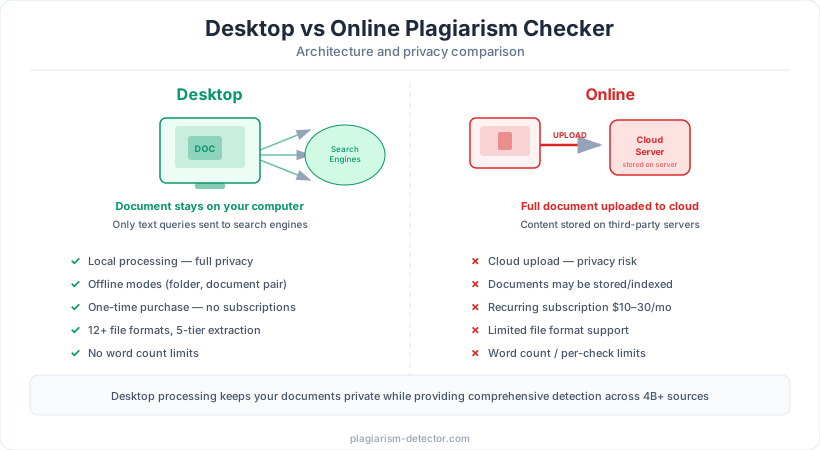
Online plagiarism checkers operate through a web browser. You either paste text into a form or upload a document file, which is transmitted to the provider's cloud servers. The server-side software then compares your text against its database, processes the results, and returns a similarity report to your browser.
This cloud-based architecture means that your entire document is uploaded, stored, and processed on third-party servers. The provider controls what happens to your content during and after processing. Processing times depend on server load and queue length — during peak periods such as end-of-semester submissions, some online tools experience significant delays as thousands of users submit documents simultaneously.
Online tools are convenient for occasional, quick checks and require no software installation. However, the cloud-dependent model introduces inherent trade-offs in privacy, reliability, and feature depth that users should understand before choosing this approach for regular or sensitive use.
How Desktop Plagiarism Checkers Work
Desktop plagiarism checkers are installed and run locally on your computer. When you check a document, the software extracts text from the file, generates search queries from the content, and sends those queries to search engines — exactly as you would manually type phrases into Google. The search results are then analyzed locally to identify matching sources and calculate similarity.
The critical distinction is that your full document never leaves your computer. Only short text fragments are sent as search queries, which is functionally identical to performing manual searches. The document itself, the analysis process, and the resulting originality report all remain on your local machine. No account creation, no cloud uploads, no server-side storage of your content.
Desktop tools can also perform checks that require no Internet connection at all. Local Folder checks compare a document against all files in a specified directory, and Document Pair checks compare two specific documents — both entirely offline. This makes desktop tools uniquely capable for environments where Internet connectivity is limited or where complete isolation from external networks is required.
Privacy and Document Security
Privacy is the single most significant difference between desktop and online plagiarism checkers, and it deserves careful consideration. When you upload a document to an online checker, you are trusting that provider with your content. Some services explicitly add uploaded documents to their comparison databases, meaning your unpublished work becomes part of the pool that future submissions are checked against.
This creates serious risks for several user groups. Researchers checking unpublished papers risk exposing their work before publication — potentially compromising novelty claims or enabling idea theft. Businesses checking proprietary content, contracts, or internal communications risk exposing confidential information to a third party. Students at institutions covered by FERPA (in the US) or GDPR (in the EU) may have their educational records exposed in ways that conflict with data protection regulations.
Desktop plagiarism checkers eliminate these risks entirely. Since the full document is processed locally and never uploaded, there is no possibility of third-party data exposure. No server breach, no terms-of-service change, and no corporate acquisition can compromise documents that were never transmitted in the first place. For any user handling sensitive, confidential, or unpublished material, the desktop approach provides a level of privacy that no cloud-based service can match.
Accuracy and Detection Capability
Detection accuracy depends on two factors: the technology used for comparison and the breadth of sources searched. A common misconception is that online tools with large proprietary databases are inherently more accurate than desktop tools. In practice, a desktop tool that queries multiple search engines in real time accesses a far larger and more current source pool.
Desktop tools like Plagiarism Detector search across 4+ billion indexed pages via Google, Bing, Yahoo, and DuckDuckGo simultaneously — a scope no proprietary database can match. Combined with rewrite detection for paraphrased content, a Unicode Anti-Cheating Engine for character substitution, and AI content detection with 0.98 sensitivity, the detection coverage is comprehensive and multi-layered.
Online tools often restrict the number of sources checked or the depth of analysis based on your subscription tier. Free or basic plans may search only a fraction of available sources. Desktop tools with a one-time purchase model have no such tiered restrictions — every check uses the full detection capability regardless of how many documents you process.
File Format Support and Text Extraction
The ability to accurately extract text from diverse document formats is fundamental to reliable plagiarism detection. Online tools typically accept a limited range of formats — most support DOCX and PDF, some support TXT, and few support the full range of formats that users work with in practice.
Desktop tools can invest in deep file format support because they leverage the full capabilities of the local operating system. Plagiarism Detector supports 12+ file formats including DOC, DOCX, PDF, RTF, PPT, PPTX, TXT, ODT, HTML, and more. Its 5-tier text extraction pipeline (DocX native parsing, iFilter, OpenXML SDK, and Apache Tika fallback) ensures accurate text extraction even from complex documents with embedded objects, footnotes, and unusual formatting.
Poor text extraction is a hidden source of detection failures. If a tool cannot accurately read the text from your document, it cannot reliably find matching content in its source database. The desktop environment provides access to system-level document processing capabilities (such as Microsoft's iFilter technology) that are unavailable to browser-based online tools, giving desktop checkers a structural advantage in extraction quality.
Check Your Text with Plagiarism Detector
Download a free demo or purchase a license to start checking for plagiarism and AI-generated content.
Cost Comparison
The pricing difference between desktop and online plagiarism checkers is substantial and strongly favors the desktop model for regular users. Online tools typically charge through subscriptions ($10-$30 per month, or $120-$360 per year) and may add per-page or per-word fees on top. Some institutional licenses cost thousands of dollars annually with per-student pricing.
Desktop tools use a one-time purchase model. Plagiarism Detector offers a Personal license at $49.99 and a Professional license at $69.99 — a single payment for permanent use with no recurring costs, no word count limits, and no per-check fees. The break-even point compared to a typical $20/month subscription is approximately three months. Every month after that, the desktop tool is effectively free.
For institutions, the cost difference is even more dramatic. A university paying $3-$5 per student annually for a cloud-based service may spend $30,000-$150,000 per year for an enrollment of 10,000-30,000 students. Desktop-based solutions with per-seat licensing or site licenses can reduce this cost by an order of magnitude while simultaneously providing stronger privacy protections for student data.
When to Choose Desktop vs. Online
The right choice depends on your specific requirements, but in most scenarios, desktop tools offer objective advantages. Choose a desktop plagiarism checker when privacy matters (unpublished research, business documents, student data under FERPA/GDPR), when you need comprehensive detection (rewrite detection, AI analysis, Unicode anti-cheating), when you check documents regularly (no subscription costs or usage limits), or when you work with diverse file formats.
Online tools may be appropriate for occasional, low-stakes use where convenience outweighs other factors — for example, a quick check of a blog post on a shared computer where installing software is not possible. They may also be preferred in environments where IT policies restrict desktop software installation.
For the vast majority of users — educators, students, researchers, publishers, and businesses — a desktop plagiarism checker provides better accuracy, stronger privacy, lower long-term cost, and a richer feature set. The combination of local document processing, multi-engine Internet search, advanced detection technologies, and one-time purchase pricing makes the desktop approach the more practical and more secure choice.
Frequently Asked Questions
Is my document safe when I use an online plagiarism checker?
It depends on the provider. Many online plagiarism checkers store uploaded documents on their servers and some add them to their comparison databases. Your document may be retained indefinitely and used as a source for future checks. If your document contains sensitive, confidential, or unpublished content, a desktop plagiarism checker that processes files locally and never uploads them is the safer choice.
Can desktop plagiarism checkers search the Internet?
Yes. Desktop plagiarism checkers like Plagiarism Detector send text fragments as search queries to multiple search engines (Google, Bing, Yahoo, DuckDuckGo), searching across 4+ billion indexed pages. The full document is never uploaded — only short query phrases are sent, exactly as if you were searching manually. This provides broad Internet coverage while keeping your document private.
Do desktop tools work without an Internet connection?
Partially. Internet-based checks (searching web sources, academic databases) require connectivity. However, desktop tools offer offline check modes that online tools cannot: Local Folder checks compare your document against all files in a directory, and Document Pair checks compare two specific files. These offline modes work entirely without Internet access, making desktop tools uniquely versatile.
Are desktop plagiarism checkers harder to use than online tools?
Modern desktop plagiarism checkers are designed for ease of use. Installation is a standard process, and the software typically includes a clear interface for selecting documents and check types. Features like Microsoft Word and PowerPoint add-ins allow checking directly from familiar applications. Folder Watch enables automated batch processing by simply placing files in a designated folder — no manual intervention required.
Which is more cost-effective: desktop or online plagiarism checker?
Desktop tools are significantly more cost-effective for regular use. A one-time purchase of $49.99-$69.99 provides permanent access with no recurring fees or usage limits. Online subscriptions at $10-$30 per month cost $120-$360 annually, often with additional per-check charges. The desktop tool pays for itself within two to three months of regular use and costs nothing afterward.


 Stand with Ukraine!