PDAS indexes the documents you give it - theses, coursework, archives, internal reports - into a private database on a PC or server you control. Every Plagiarism Detector seat on your local network can then check new documents against that corpus, catching recycled papers and cross-semester reuse that no Internet search can find.
Nothing leaves your network. The corpus, its index and every query stay on your own hardware, and PDAS answers Plagiarism Detector over a local HTTP API. Your documents are never pooled with other institutions or stored with any third party.
PDAS is a server product, not a desktop add-in. The installer asks you no questions: it deploys the application to Program Files, creates the database in ProgramData, registers three Windows services - the database engine, the local web API and the PDAS indexing service - adds a Windows Firewall rule for the API, and puts the PDAS Control Center in the Start menu.
Updating is safe. Running a newer installer over an existing PDAS keeps your accumulated document database, so the corpus you have built is never lost to an upgrade.
PDAS is an add-on to licensed Plagiarism Detector seats. Because it runs as Windows services, it keeps working with nobody signed in to the server.
| Feature | Free Demo | Lite | Personal | Pro | Portable |
|---|---|---|---|---|---|
| PDAS connectivity | ![]() |
![]() |
![]() |
![]() |
![]() |
PDAS takes its identity from the Plagiarism Detector installation on the same PC, so install Plagiarism Detector on the server PC before you start. Without it the PDAS installer stops and tells you why.
Download PDAS-Setup.exe using the link above and run it. It downloads the server components, sets up the database and web services, and starts them. It needs administrator rights and an Internet connection while it runs.
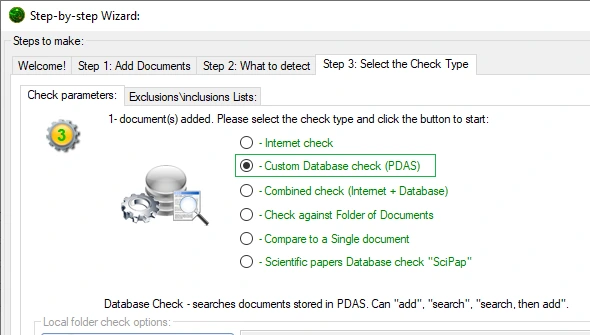
Open the PDAS Control Center and add the documents you want to check against. Then, in Plagiarism Detector, choose "Custom Database check (PDAS)" in step 3 of the check wizard to search your own corpus.